Showing posts with label E-Mail tricks. Show all posts

Block Incoming Email Of Sender on Gmail and Yahoo

There are many reasons that make you to block certain users from yours Email list , and it is also necessary to block those emailers who are sending you spam at regular intervals , Hackers are sending virus and harmfuls codes to hack emails account througn mails.so it is always recommended to block all those emails using Filters on Emails.

How To Block Emailers Email On Gmail

Click Create a filter under the search box at the top of any Gmail page.Fill in the appropriate fields with the filter’s criteria, and click Next Step.

Facebook tips and tricks

Choose the action you’d like for these messages by checking the appropriate box. ( In this case, we suggest checking Delete it. ) Click Create Filter.

trick in facebook,facebook background,manage facebook chat,chat with friend,trick manage facebook,block incoming email,facebook friends photos,gmail and yahoo,facebook fullpost display,friends photos displayed,transfer orkut photos,trick in facebook,facebook background,manage facebook chat

To edit or disable a filter, click Settings at the top of any Gmail page, and open the Filterstab.

How To Block Emails/Sender On Yahoo

Yahoo Mail Classic- Follow the  Options link in the top navigation bar.Select Block Addresses, Enter the email address you want to be blocked under Add Block, Select Add Block , Select Yes to set the block.
New Yahoo Mail - Select Options > Mail Options  in Yahoo! Mail , Go to the Spam category ,Type the unwanted email address under Add a blocked address , Click Add , Now click Save Changes.


Reference: hongkiat.com
Export and Download Facebook Friends Private Email Addresses on Desktop

Wondering How you Can perform this Job , Now no need to Wonder as this is possible and you can easily Export or Download all your Facebook Friends Private Email Addresses on Your Desktop or PC.

Create a Yahoo email account. Even if you have an old one, create a new one so that the imported contacts are clean.

Click on import contacts “Get Started” link and then choose Facebook. Note – Use Classic Mail

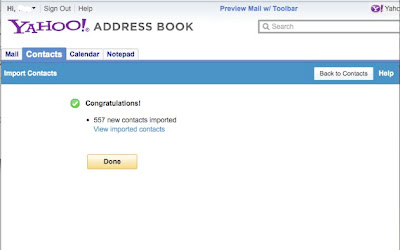
Authorize Yahoo in the Facebook pop up and then wait a few seconds. You’ll see a confirmation screen like this:

Facebook tips and tricks


Now imported the names and email addresses of all your Facebook friends into Yahoo. Now just click “Tools” in Yahoo mail and export.


trick in facebook,facebook background,manage facebook chat,chat with friend,trick manage facebook,block incoming email,facebook friends photos,gmail and yahoo,facebook fullpost display,friends photos displayed,transfer orkut photos,trick in facebook,facebook background,manage facebook chat

CSV format is a good format for uploading to Gmail or your desktop contact book. Save the file to your desktop, and you’re done.


Reference: hongkiat.com